

The Australian UDI Database for sponsors and manufacturers
Learn about the Australian Unique Device Identification Database (AusUDID) and how to use the database to comply with UDI requirements.
The Australian Unique Device Identification Database (AusUDID) stores your UDI-DIs and related data for medical devices you supply in Australia. The UDI records link to your relevant inclusion(s) in the Australian Register of Therapeutic Goods (ARTG).
You can submit and maintain your UDI-DIs and related data in the AusUDID. Patients, consumers, clinical quality registries and health professionals can access this medical device information, at no cost.
AusUDID environments
There are 2 environments of the AusUDID:
- AusUDID Production
- AusUDID Pre-Production.
Each environment supports different AusUDID usage scenarios of sponsors and manufacturers.
Production
The Production environment (referred to as the AusUDID) is the live version of the database. To be compliant with UDI requirements, your UDI-DIs and related data must be published in the AusUDID.
Pre-Production
AusUDID Pre-Production operates alongside the AusUDID.
You can use the Pre-Production environment to familiarise yourself with the AusUDID, including testing of:
- submission methods
- database functionality.
Sponsors or manufacturers using the Machine to Machine HL7 SPL submission method must validate their messages and interactions in the Pre-Production environment before submitting to the AusUDID.
Data submitted to the AusUDID Pre-Production environment is not transferred to the AusUDID.
AusUDID Pre-Production data will not be considered compliant with UDI requirements.
We do not guarantee or warrant the accuracy, reliability, completeness, currency or usefulness of the information published in the Pre-Production environment. Only data from the AusUDID should be used for any purpose outside the context of testing.
Accessing AusUDID
You can access the AusUDID here: TGA AusUDID.
Sponsors and manufacturers can log into the AusUDID through the following link: www.ebs.tga.gov.au.
For instructions on logging into the AusUDID, see Logging into the AusUDID Pre-Production and Production environments.
Accessing AusUDID Pre-Production
To access AusUDID Pre-Production, you must have a TGA Business Services (TBS) account for your organisation and you must be an associated contact with login credentials.
Some organisations, such as overseas manufacturers, were TBS users in the past and you may not have an active TBS account with login credentials. If you need assistance getting access to TBS and the AusUDID, contact TBS at ebs@health.gov.au.
You can access the AusUDID Pre-Production environment via the button available in the AusUDID Production environment.
Alternately, you can access AusUDID Pre-Production by following the steps in this guide: Logging into the AusUDID Pre-Production and Production environments.
Sponsor and manufacturers roles and responsibilities
Your organisation type impacts your organisation’s abilities in the AusUDID.
Sponsors are responsible for submitting and maintaining UDI records. Manufacturers may do so on behalf of the sponsor, but the legal responsibility for compliance remains with the sponsor.
The AusUDID supports both manufacturers and sponsors creating and maintaining the UDI records. However, your abilities differ depending on your organisation type.
If you are not a sponsor or manufacturer and do not have a TBS account, you can still use the AusUDID for:
- searching and viewing public UDI records
- downloading public UDI records
- exporting public UDI records
- downloading the full database.
The following table describes the actions that sponsors and manufacturers organisations can complete:
| Manufacturer* | Sponsor | Sponsor and manufacturer | |
|---|---|---|---|
| Draft UDI record | yes | yes | yes |
| Edit draft UDI record | yes | yes | yes |
| Delete draft UDI record | yes | yes | yes |
| Publish UDI record* | yes | yes | yes |
| Edit published UDI record | yes | yes | yes |
| Link ARTG details to a UDI record | no | yes | yes |
| Attach supporting documents to a UDI record | no | yes | yes |
| Replace supporting documents on a UDI record | no | yes | yes |
| Remove supporting documents from a UDI record | no | yes | yes |
| Submit UDI records using Australian UDI Bulk Upload Template | yes *Manufacturers cannot submit ARTG IDs. | yes | yes |
| Link ARTG details to a UDI record using Australian UDI Bulk ARTG to UDI Link Template | no | yes | yes |
*Manufacturers can complete many of the same actions as a sponsor, including drafting and publishing UDI records. However, as manufacturers are not the legal owner of ARTG entries, they are unable to link an ARTG to a UDI record. This responsibility remains with the sponsor.
UDI records published by manufacturers are visible to sponsors, allowing the sponsor to link their ARTG to the UDI record. However, the UDI record remains in a ‘published but not publicly available’ state until an ARTG is linked. This means that public users cannot view the UDI record.
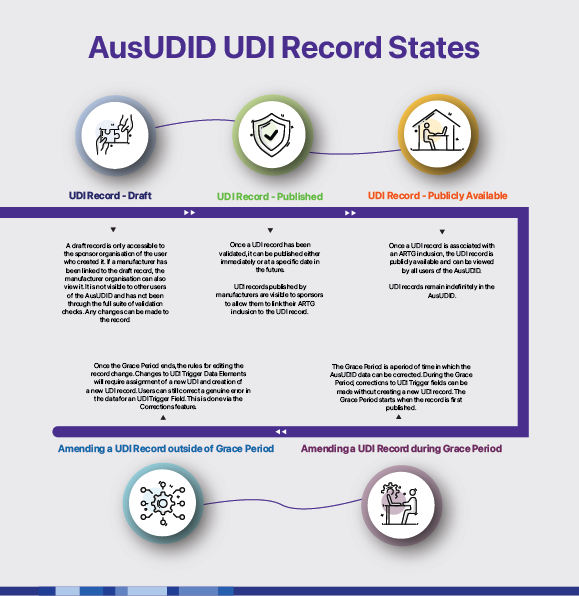
For more information, see AusUDID UDI record states.
It is important to note that to be compliant with UDI requirements, the UDI record must be linked to an ARTG and be publicly available.
TBS system roles
Your TBS system role impacts your individual ability in the AusUDID.
The below table describes the actions that each TBS role can do:
| Administrator | Drafter | Submitter | Financial | |
|---|---|---|---|---|
| Add contacts to TBS | yes | no | no | no |
| Access UDI management centre | no | yes | yes | no |
| Draft UDI record | no | yes | yes | no |
| Edit draft UDI record | no | yes | yes | no |
| Publish UDI record | no | yes | no | |
| Link ARTG details to a UDI record | no | yes* *Draft records only. | yes | no |
| Attach supporting documents to UDI record | no | yes* *Draft records only. | yes | no |
| Replace supporting documents on UDI record | no | yes* *Draft records only. | yes | no |
| Remove supporting documents from UDI record | no | yes* *Draft records only. | yes | no |
| Submit UDI records using Bulk Upload template | no | no | yes | no |
| Link ARTG details using Bulk Upload ARTG ID mappings template | no | no | yes | no |
The combination of your organisation type and TBS role determines your full abilities in the AusUDID.
Example of the combination of roles

| Harry: Manufacturer, Submitter Harry is a manufacturer with a TBS role of submitter. Harry can:
However, because Harry is not a sponsor, Harry cannot link an ARTG ID to his UDI records. Harry’s UDI records remain in a ‘published but not publicly available’ state until his sponsor adds their ARTG IDs to the UDI records. |

| Sophie: Sponsor, Drafter Sophie is a sponsor with a TBS role of drafter. Sophie can:
Because Sophie is a drafter, she can only draft UDI records but cannot publish them. This means that Sophie’s records remain in draft state until a submitter in her organisation publishes the record. |
It is important to understand the abilities and limitations of TBS roles. If you wish to change TBS roles, you must contact the Administrator of your organisation’s TBS account.
Adding users to TBS for UDI submission purposes
Every individual user intending to manage data in the AusUDID must be associated with an active TGA Business Services (TBS) account.
If your organisation has a TBS account but you are not associated with the account, your administrator must add you as a contact.
If your organisation does not have a TBS Account, contact TBS support at ebs@health.gov.au. Information on TBS and TBS Accounts is provided on the TGA website at TGA Business Services (TBS).
TBS system roles
The administrator of your TBS account is responsible for adding members of your organisation to your organisation’s TBS account for UDI submission purposes. It is your administrator’s responsibility to select the appropriate system role for this user.
Organisation contact roles
We recommend that if the member of your organisation is being added for UDI submission purposes only, that the administrator does not assign an ‘Organisation contact role’ to this member’s contact.
Organisation contact roles, such as Medical Device Regulatory Affairs Contact, are used by the TGA to determine who is best suited in your organisation to contact in scenarios such as post market reviews. Adding organisation contact roles may unintentionally involve members of your organisation in actions or distributions other than UDI.
If you do not wish the member of your organisation being added for UDI submission purposes to be contacted by the TGA, we recommend you also select ‘FirstName is not authorised to speak with the TGA’. By selecting this option, the member of your organisation will not be contacted for non-UDI related purposes.
UDI records
A UDI record is made up of a UDI-DI and related data. This data includes information about the device as well as the supply of the device, such as:
- device class
- GMDN
- manufacturer details
- sponsor details
- commercial distribution status.
The UDI-PI is not included in a UDI record.
UDI record history
The AusUDID includes a history of all changes to each UDI record. We store this data in the AusUDID indefinitely, and it is available at no cost to all users.
UDI record retention
All records in the AusUDID remain indefinitely. This is to ensure that historical information about medical devices is available, when necessary.
The UDI record must not be deleted, even if the device is no longer in supply. When a medical device is no longer in commercial distribution, the sponsor must change the Sponsor Commercial Distribution End Date in the UDI record to reflect this.
Data entry rules
Submitting a UDI record successfully requires meeting the AusUDID data validation rules. These rules help ensure accuracy of the data and correct compliance with the UDI requirements.
Accurate and up to date data
Data submitted in a UDI record must be accurate at the time of submission and it must be kept up to date while the device is in commercial distribution.
If changes occur to a device that change a UDI Trigger data element, a new UDI record must be submitted within 30 days of supply of the changed device in Australia.
If changes occur to a device that does not change a UDI Trigger data element, the UDI record must be updated within 30 days of supply of the device in Australia.
Data validation
The AusUDID validates each UDI record to ensure:
- the manufacturer matches the manufacturer in the linked ARTG inclusion
- the UDI-DI format complies with the selected Issuing Agency - for example, correct length, numeric or alphanumeric structure
- mandatory fields are complete and meet permitted value requirements
- conditional fields are provided when required - for example, Unit of Use or Direct Marking DI provided if Device Count is greater than one.
Tip: Use the Australian UDI Data Dictionary to check permitted values and rules before submission.
UDI record submission responsibilities
Both sponsors and manufacturers can submit UDI records to the AusUDID. However:
- UDI records submitted by manufacturers are published but not publicly available until a sponsor links an ARTG ID
- sponsors must add sponsor-specific details and link the ARTG ID to make the UDI record publicly available.
Sponsors and manufacturers must work together to decide:
- how UDI records will be submitted
- whether the manufacturer will submit the initial device data.
If both parties want to contribute data:
- the manufacturer can submit the device data
- the sponsor can add the sponsor data.
Submitting data to the AusUDID
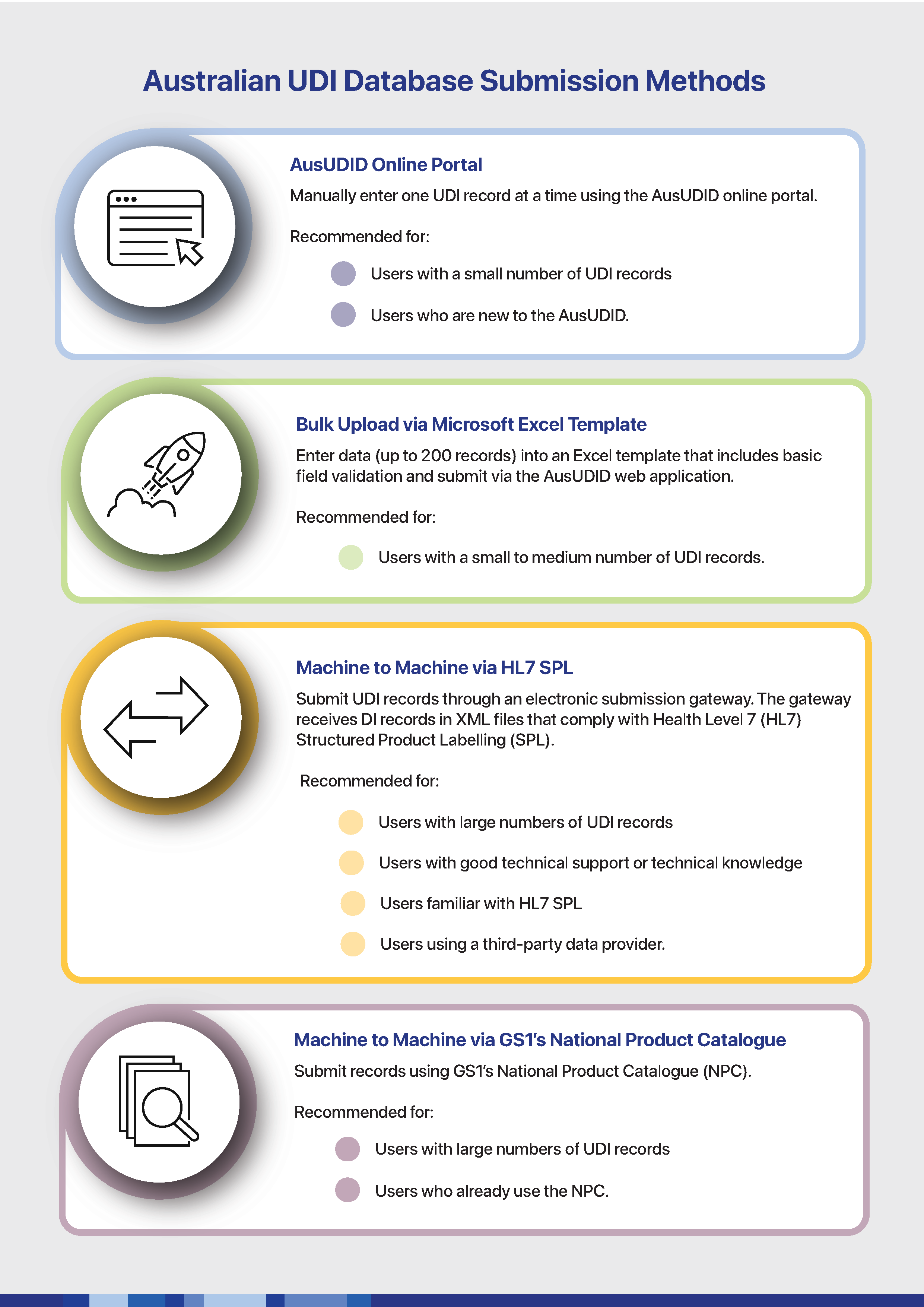
You can use any of the 4 available methods to submit UDI records and related data to the AusUDID.


Correcting and updating UDI data
We recognise there are many scenarios in which device data will change over time. These include:
- correcting data errors
- applying clinically relevant changes to the device
- changes to Issuing Agency requirements
- where you supply a single device to multiple countries with different UDI requirements.
To accommodate this, we allow both corrections and updates to data in the AusUDID.
Whether a change to a UDI record is an update or a correction depends on the purpose of the change.
Update a UDI record
Updates are changes to a UDI record due to the device or the devices characteristics changing. Updates are only permitted for non-UDI Trigger data elements. Updates to UDI Trigger data elements are not permitted, as the device requires a new UDI-DI and UDI record.
As a sponsor, it is your responsibility to keep your UDI record(s) up to date. You must update your UDI record within 30 days of the changes to the device if the changes do not trigger a new UDI-DI.
Correct a UDI record
Corrections are changes to a UDI record due to the data being incorrect. This may be because of a data entry error or technical error.
If you have supplied incorrect data to the AusUDID, you can correct your data error in the AusUDID. The AusUDID keeps an audit trail of the changes made, who made them and when.
The method for correcting data errors varies based on whether the UDI record is in the Grace Period.
AusUDID Grace Period
The Grace Period is a set time frame that begins once you have published your initial version of the UDI record. During this time frame, you can make any needed changes to any data element. The purpose of the Grace Period is to allow you fix errors in the UDI record. The Grace Period allows these changes without triggering the need for a new UDI-DI.
Grace Period length: 30 days
Note that the length of the Grace Period is subject to change as we introduce UDI and the AusUDID.
Changing UDI records in the Grace Period
You can update or correct any data field during the Grace Period. UDI Trigger rules do not apply during the Grace Period.
Changing UDI records outside the Grace Period
You can correct any errors outside the Grace Period however different actions will be required depending on whether the correction is to a UDI Trigger data element or not.
If you need to correct a UDI Trigger data element, you can fix it by electing to make a Correction and giving your reasoning for why the change is needed. We may review these reasons and the corrections to data errors.
All 4 data submission methods will prevent you from changing UDI Trigger data elements outside of the Grace Period, presenting an information message advising you that you are changing UDI Trigger data elements outside of the Grace Period. You must either make the change as a correction or create a new UDI record.
You can update any non-UDI Trigger data elements at any time outside the Grace Period.
Multiple sponsors of the same device
Because of the nature of medical device regulation in Australia, it is possible that 2 or more sponsors supply the same model of medical device with the same UDI-DI.
When there are multiple sponsors of the same device, the sponsors link to the same UDI record. This is to avoid different information about the same device, reducing confusion for the end user such as healthcare professionals and members of the public.
When there are multiple sponsors of the same device linked to a UDI record, further distinction of UDI data elements is required. UDI data elements are separated into 2 categories when more than one sponsor is linked to a UDI record:
- 'Device' data elements
- 'Sponsor' data elements.
Device data elements are the data elements that are common between sponsors, as these are determined by the manufacturer. Device data elements that are also UDI Trigger data elements remain UDI Trigger data elements.
Sponsor data elements are the data elements that are specific to each sponsor and can only be edited by the sponsor they relate to.
You can find out which data elements are UDI Triggers, Device data elements or Sponsor data elements in the Australian UDI Data Dictionary.
Submitting UDI records
As a sponsor, you are responsible for submitting UDI records for your devices. Where you are the first sponsor submitting the UDI record, you can submit the UDI record as normal.
If another sponsor has already submitted the UDI record for the device, you only need to:
- add your sponsor data, such as ARTG ID and Catalogue Number (if applicable)
- ensure your data is accurate and complete.
You do not need to duplicate or resubmit the existing UDI record. Once you add your sponsor data, you meet UDI compliance requirements.
Data elements for multiple sponsors
For UDI records linked to multiple sponsors, the AusUDID will manage changes to the data based on whether the data element being changed is a Device data element or a Sponsor data element:
- Device data elements are to be consistent across all sponsors of the device; this data should be controlled by the manufacturer
- Sponsor data elements are unique to each sponsor and editable only by that sponsor.
The assignment of Device categories to each UDI data element is indicated in the online screens of the AusUDID via a ‘D’ icon. Data elements without a ‘D’ icon are Sponsor data elements.
UDI Trigger data elements are indicated by a 'T' icon.


You can find more information on Device and Sponsor data elements in the Australian UDI Data Dictionary.
All other data element rules remain the same, including UDI Trigger data element rules.
Updating or correcting UDI records
If you change a UDI record that is linked to multiple sponsors:
- all changes to data elements that are categorised as Device data must be recorded as a correction action. This includes changes to non-UDI Trigger data elements
- the reason for the change must be provided.
All changes are logged and viewable using the device ‘History’ tab.
Responsibility and resolution of data disputes
You are only responsible for the data that you provide. If you are the first sponsor to add the UDI record, you are responsible for the UDI record as a whole. If you are a subsequent sponsor who links an ARTG ID to the UDI record, you are responsible for ensuring that the data in the UDI record is accurate and up to date at the time of linking your ARTG ID.
If another sponsor changes data incorrectly, you are not responsible for this change. The sponsor who changed the data to be incorrect is responsible. If you believe a change to the UDI record is wrong, contact the UDI Support Team at UDI@health.gov.au.
Downloading AusUDID data
The AusUDID allows you to search and download UDI data, including individual records or the full database.
Page history
- Updated Grace Period length from 7 days to 30 days.
- Added new sections:
- Data entry rules
- Submitting UDI records
- Data elements for multiple sponsors
- Updating or correcting UDI records
- Responsibility and resolution of data disputes
- Some minor updates to existing content.
- Updated Grace Period length from 7 days to 30 days.
- Added new sections:
- Data entry rules
- Submitting UDI records
- Data elements for multiple sponsors
- Updating or correcting UDI records
- Responsibility and resolution of data disputes
- Some minor updates to existing content.