

AusUDID roles and responsibilities
Understand the roles in the AusUDID and what each role can do.
Your organisation type and TGA Business Services (TBS) system role determine what you can do in the Australian Unique Device Identification Database (AusUDID).
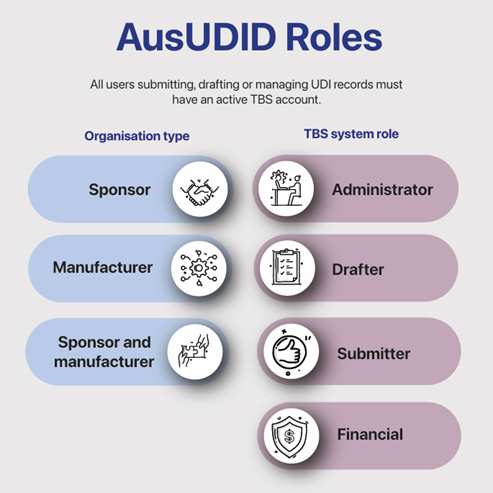

Organisation types
Your role and responsibilities vary depending on your organisation type.
Sponsors and manufacturers
Both sponsors and manufacturers can submit UDI records to the AusUDID; however, their abilities differ:
- Manufacturers can publish UDI records but cannot add sponsor-specific data such as Australian Register of Therapeutic Goods (ARTG) IDs. UDI records published by manufacturers are not publicly available until a sponsor links an ARTG ID. UDI records that are not publicly available are only visible to logged-in users, such as sponsors.
- Sponsors can publish complete UDI records, including the sponsor-specific data. Sponsors can also link ARTG IDs to manufacturer-published UDI records to make them publicly available, which will also satisfy the UDI compliance requirements.
Sponsors and manufacturers must work together to decide:
- how UDI records will be submitted
- whether the manufacturer will submit the initial device data.
Tip
If both parties want to contribute data:
- the manufacturer can submit the device data, and the sponsor can add the sponsor data, or
- the manufacturer can provide the device data to the sponsor, who then submits the full record.
The table below describes the actions that sponsors and manufacturers organisations can complete.
| Activity | Manufacturer | Sponsor | Sponsor and manufacturer |
|---|---|---|---|
| Draft UDI record | yes | yes | yes |
| Edit draft UDI record | yes | yes | yes |
| Delete draft UDI record | yes | yes | yes |
| Publish UDI record* | yes | yes | yes |
| Edit published UDI record | yes | yes | yes |
| Link ARTG details to a UDI record | no | yes | yes |
| Attach supporting documents to a UDI record | no | yes | yes |
| Replace supporting documents on a UDI record | no | yes | yes |
| Remove supporting documents from a UDI record | no | yes | yes |
| Submit UDI records using Australian UDI Bulk Upload Template | yes *Manufacturers cannot submit templates with the ‘Sponsor’ worksheet filled out. | yes | yes |
| Link ARTG details to a UDI record using Australian UDI Sponsor Link Template | no | yes | yes |
Note
The sponsor holds legal responsibility for UDI compliance. This includes submitting, maintaining, and ensuring the accuracy of UDI records.
Agents
Sponsors and manufacturers may engage an agent to act on their behalf.
Agents can perform all activities for the organisation they are representing. For example, if a sponsor engages an agent, the agent can do all activities of the sponsor. If a manufacturer engages an agent, the agent can do all activities of the manufacturer.
Note
Sponsors and manufacturers may allow an agent to submit UDI records by appointing them as an agent. However, this access also allows the agent to view other areas of the organisation’s TBS account, which may not be appropriate depending on the relationship between the parties.
For more information on agents, see: Add or remove an agent from your organisation.
Third party data providers
Third party data providers may submit UDI records on behalf of a sponsor or manufacturer using the machine to machine HL7 SPL submission method.
However, they cannot create their own TBS account.
To have a TBS account, an organisation must be registered as a sponsor, manufacturer, or agent in TBS. Third party data providers do not meet the eligibility for any of these roles.
The AusUDID uses real data sources to validate data submissions, including test submissions in AusUDID Pre Production. As third party data providers do not possess their own data such as ARTG IDs, they cannot have separate test accounts as they would be unable to pass data validation. They must work with their clients to test AusUDID submissions.
Note
Sponsors and manufacturers may allow a third party data provider to submit UDI records by giving them access to their TBS account as a ‘Submitter’ or by appointing them as an agent. However, this access also allows the third party to view other areas of the organisation’s TBS account, which may not be appropriate depending on the relationship between the parties.
TBS system roles
Your TBS system role impacts your individual ability in the AusUDID.
The TBS portal allows you to manage some therapeutic good registration applications, including UDI record submissions to the AusUDID.
You can find information on TBS accounts on the TGA website, including how to:
- reset your password
- search for an organisation contact
- view organisation contacts
- read TBS terms and conditions.
For more information, see: TGA Business Services (TBS).
Administrator
Administrators add users to the organisation’s TBS account. They cannot access, edit or submit any UDI records.
Drafter
Drafters can draft and edit UDI records, but only in draft form. They cannot:
- submit UDI records
- use the Australian UDI Bulk Upload Template or link ARTG details using the Australian UDI Sponsor Link Template.
Submitter
Submitters can access, edit and submit all UDI records, including bulk uploads.
Financial
Financial users cannot manage UDI records.
Note
Users with multiple roles may complete the activities of each role. For example, a user with Administrator and Submitter roles may complete the activities of both the Administrator and Submitter.
Summary of TBS system roles
The table below describes the actions that each TBS role can do.
| Activity | Administrator | Drafter | Submitter | Financial |
|---|---|---|---|---|
| Add users to TBS | yes | no | no | no |
| Access UDI Management Centre | no | yes | yes | no |
| Draft UDI record | no | yes | yes | no |
| Edit draft UDI record | no | yes | yes | no |
| Publish UDI record | no | no | yes | no |
| Link ARTG details to a UDI record | no | yes* *Draft records only. | yes | no |
| Attach supporting documents to UDI record | no | yes* *Draft records only. | yes | no |
| Replace supporting documents on UDI record | no | yes* *Draft records only. | yes | no |
| Remove supporting documents from UDI record | no | yes* *Draft records only. | yes | no |
| Submit UDI records using Australian UDI Bulk Upload Template | no | no | yes | no |
| Link ARTG details using Australian UDI Sponsor Link Template | no | no | yes | no |
TBS contact roles
If a member of your organisation is added only for UDI submission purposes, we recommend that the Administrator does not assign an organisation contact role to that user.
Organisation contact roles, such as Medical Device Regulatory Affairs Contact, tell the TGA who to contact for activities such as post-market reviews. Assigning these roles may involve staff in activities that go beyond UDI.
If you do not want a user involved in TGA contact, we recommend selecting ‘FirstName is not authorised to speak with the TGA’ when creating their profile. This ensures they are not contacted for non-UDI purposes.
Adding users to your TBS account
If your organisation has a TBS account and you do not have a user account, your Administrator must add you.
Overseas manufacturers exist have organisation accounts in TBS but may not have users because they previously have not interacted with the TGA. Overseas manufacturers can request a TBS user account by contacting the TBS Helpdesk at ebs@health.gov.au.
How organisation types and TBS system roles determine your abilities
Your organisation type and your TBS system role work together to determine what you can do in the AusUDID.
It is important to understand the abilities and limitations of TBS roles. If you wish to change TBS roles, you must contact the Administrator of your organisation’s TBS account.
Harry: Manufacturer, Submitter
Harry is a manufacturer with a TBS role of Submitter. Harry can:
- access the AusUDID
- draft UDI records
- publish UDI records.
Because Harry is a manufacturer and not a sponsor, he cannot link an ARTG ID to his UDI records. His UDI records are ‘published but not publicly available’ until his sponsor adds their ARTG IDs to the UDI records.
Sophie: Sponsor, drafter
Sophie is a sponsor with a TBS role of Drafter. Sophie can:
- access the AusUDID
- draft UDI records.
Because Sophie is a sponsor, she can include all data in her UDI records, including the ARTG ID. However, because Sophie is a Drafter, she cannot publish UDI records. Her UDI records stay in draft until a Submitter in her organisation publishes them.
Page history
Updated references to Australian UDI Sponsor Link Template.
Original publication
Updated references to Australian UDI Sponsor Link Template.
Original publication