To log into the Australian Unique Device Identification Database (AusUDID), you must have a TGA Business Services (TBS) account for your organisation and you must be an associated contact with login details.
All sponsor and manufacturer organisations have organisation accounts in TBS. However, some organisations such as overseas manufacturers may not have user accounts or Administrators associated with their organisation.
If you do not have a user account or an Administrator, contact the TBS Helpdesk at ebs@health.gov.au.
If you do not have a user account but you have an Administrator, your Administrator can add you as a user.
For more information on TBS roles and adding users, see AusUDID roles and responsibilities.
Note
Third party data providers cannot have their own TBS accounts.
Logging into the AusUDID Production environment
Follow the steps below to access the AusUDID Production environment.
- Visit www.ebs.tga.gov.au.
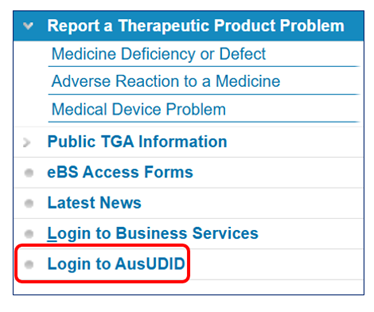
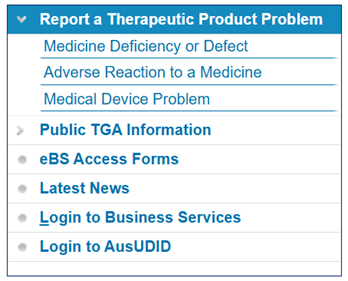
Figure 1: TBS landing page
Screenshot of the TBS landing page menu.
The TBS navigation options:
- Report a Therapeutic Product Problem
- Public TGA Information
- eBS Access Forms
- Latest News
- Login to Business Services, and
- Login to AusUDID.
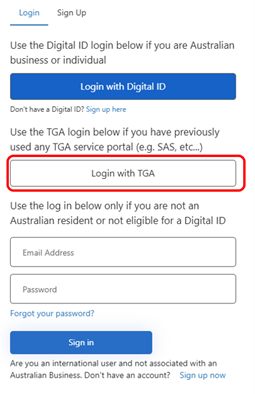
Figure 3: 'Login with TGA' button
- Select Login with TGA. This will redirect you to the appropriate login screen.
Figure 3: 'Login with TGA' button
Screenshot of 'Login with TGA' Login page showing 3 login options:
- Login with Digital ID' and 'Login with TGA'.
- A red box highlights the 'Login with TGA' to indicate that this is the action you need to take.
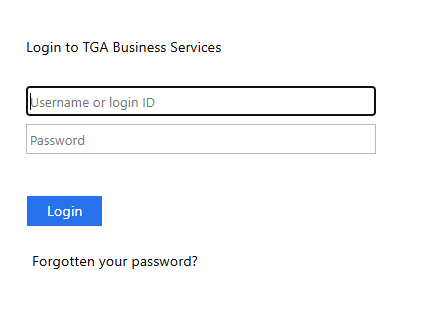
Figure 4: Username and password fields
- Enter your TBS username or login ID and password.
Figure 4: Username and password fields
A screenshot of the TBS login option, with fields for username and password.
Figure 4: Username and password fields continued
Note
You must always use the Login with TGA method, even if you have Digital ID. The TGA will advise when the other methods are enabled in the future.
Logging into the AusUDID Pre-Production environment
You can access the AusUDID Pre-Production environment using the button available in the AusUDID Production environment.
Note
We do not publish the link to the AusUDID Pre-Production environment on the TGA website to prevent unauthenticated users from accessing it unintentionally.
Follow the steps below to access the AusUDID Pre-Production environment.
- Log into AusUDID Production following the steps above.
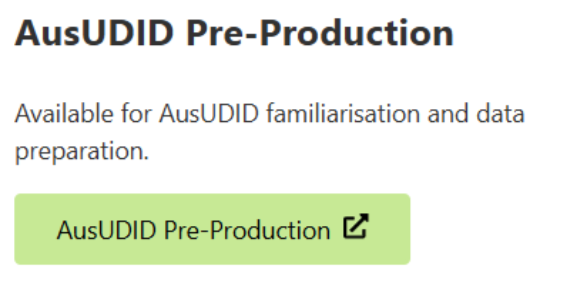
- Click the link in the green box in the UDI Management Centre.
Figure 5: AusUDID Pre-Production link
Screenshot of 'AusUDID Pre-Production' button available in the AusUDID Production environment.
Figure 6: 'Login with TGA' button
- Select Login with TGA.
Figure 6: 'Login with TGA' button
Screenshot of 'Login with TGA' Login page showing 3 login options:
- 'Login with Digital ID' and 'Login with TGA'.
- A red box highlights the 'Login with TGA' to indicate that this is the action you need to take.
Figure 7: Username and password fields
- Enter your TBS username or login ID and password.
Figure 7: Username and password fields
A screenshot of the TBS login option, with fields for username and password.
Figure 7: Username and password fields continued
Note:
You must always use the Login with TGA method, even if you have Digital ID. The TGA will advise when the other methods are enabled in the future.
Related links
Page history
Original publication