

Printing your ARTG certificate
Learn how to print your Australian Register of Therapeutic Goods (ARTG) certificate using the TGA online system, including step‑by‑step instructions.
Last updated
Although the public can view ARTG entries and public ARTG summaries, these summaries are not the same as ARTG certificates. Only the sponsor of a therapeutic good can view or print the ARTG certificate.
How to print your ARTG certificate
To view your ARTG entry or print your ARTG certificate:
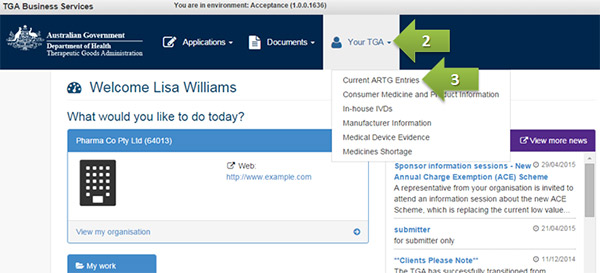
- Log in to TGA Business Services.
- Select 'Your TGA' to open the drop-down menu.
- From the menu select 'Current ARTG Entries'.
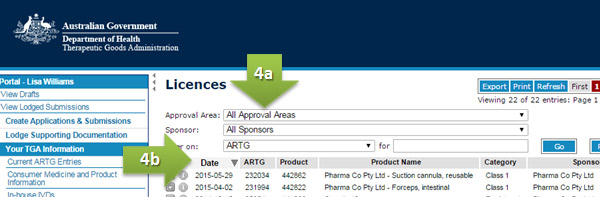
Locate the one-line summary for the ARTG entry you are interested in.
If you cannot see it, you can:
use the search drop‑down menus (for example, Approval area), or
select a column heading (for example, Date) to sort the list.
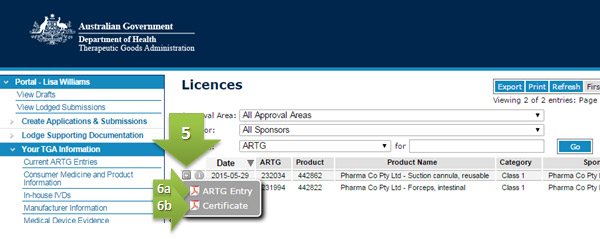
- Select the drop‑down menu icon (the downward‑facing arrow) in the first column of the ARTG entry.
Choose one of the following:
- ARTG entry – to view the summary record
- Certificate – to view or print the ARTG certificate
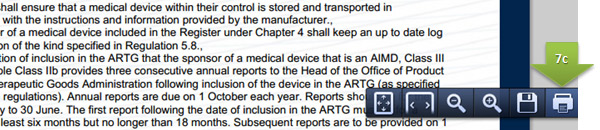
To print the certificate, use one of the following options:
- Press Ctrl + P
- Right‑click and select Print
- Select the printer icon near the bottom of the page
Product types