

Australian Unique Device Identification Database overview for healthcare
Learn how to use the Australian Unique Device Identification Database (AusUDID) and understand the information shown in the database.
This page explains how to:
- search for medical devices in the Australian Unique Device Identification Database (AusUDID)
- understand information displayed in a UDI record
- access supporting documents such as Patient Information Leaflets (PILs) and Instructions for Use (IFUs).
Australian Unique Device Identification Database (AusUDID)
The AusUDID is Australia's database for UDI records. It is a publicly accessible database that stores UDI-Device Identifiers (UDI-DIs) and other relevant information about a device, such as clinical characteristics and packaging information.
The AusUDID links to the Australian Register of Therapeutic Goods (ARTG). The ARTG is the TGA's public database for therapeutic goods that can be supplied in Australia.
You can search, view and download information from both databases at no cost.
These databases provide information that can support patient safety and informed decisions about medical devices.
Using the AusUDID
AusUDID home page
The AusUDID home page includes support information, a search bar and 4 navigation tabs:
- Home provides a search bar, navigation options and information about getting support.
- Devices lets you search for medical devices and view detailed device information.
- Downloads lets you download UDI records.
- Find supporting documents lets you find available documents associated with a medical device, such as Patient Information Leaflets (PILs) or Instructions for Use (IFUs).
AusUDID home page
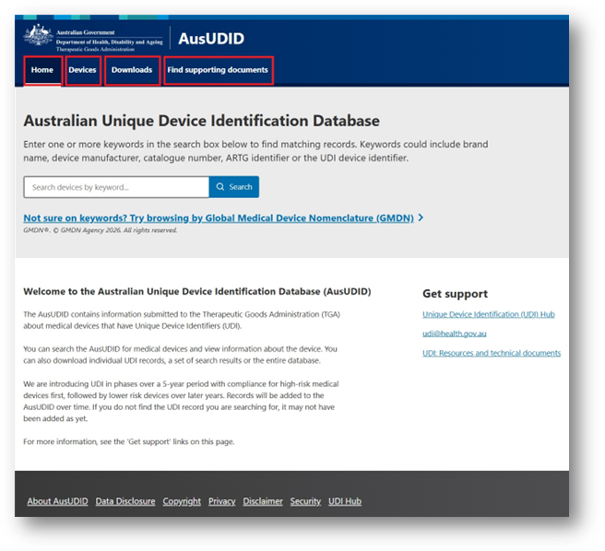

Screenshot of the AusUDID home page. The top navigation bar shows Home, Devices, Downloads and Find supporting documents, highlighted with red boxes. Below is the heading Australian Unique Device Identification Database, a keyword search field, introductory information and a Get support section with links.
Searching the AusUDID
You can use the search bar or open the Devices tab to find a medical device in the AusUDID.
Searching the AusUDID
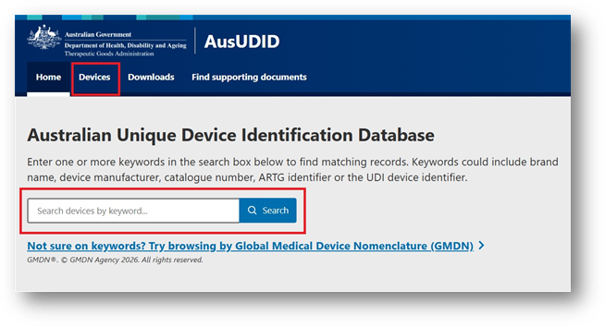

Screenshot of the Australian Unique Device Identification Database webpage. The Devices tab is highlighted in a red box in the top navigation bar. The page displays a keyword search field highlighted in a red box and a link to browse by Global Medical Device Nomenclature (GMDN).
You can search using information such as:
- UDI-DI
- ARTG ID
- brand name
- sponsor
- manufacturer.
You can also search by other keywords, including Global Medical Device Nomenclature (GMDN) term or catalogue number.
To find and view a UDI record:
- Search for the device using keywords.
- Select the correct device from the results.
- Compare the UDI record with the device label or packaging to confirm that you selected the correct UDI record for that device.
Search results
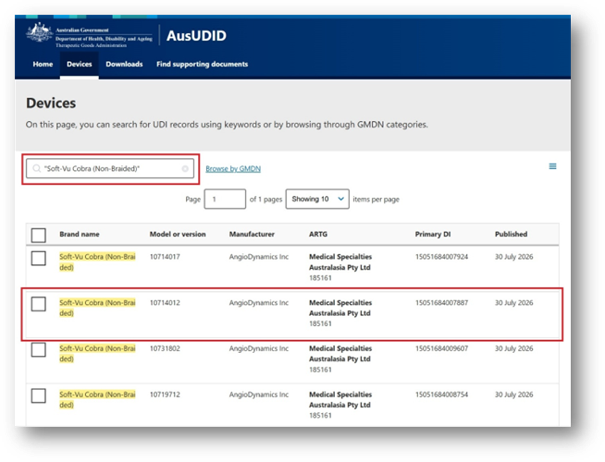

Screenshot of the AusUDID Devices page showing search results for "Soft-Vu Cobra (Non-Braided)". A red box highlights the search field, and another red box highlights one result in a results table showing the brand name, model or version, manufacturer, ARTG, Primary DI and published date for the record.
If you cannot find a UDI record for a medical device, it may be because:
- The UDI record has not been submitted yet. Some manufacturers may apply UDI labels before they are required to comply but have not yet prepared or submitted their UDI data.
- The device has a UDI because of UDI requirements in another country or region. For example, the device may have a UDI to meet requirements in the United States or European Union. Not all devices are required to meet UDI requirements in Australia, so they may not have a corresponding UDI record.
- The product is not regulated as a medical device in Australia. Depending on the product, it may be regulated as a medicine or other therapeutic good and may not be subject to UDI requirements.
If you believe a product should have a UDI record but cannot find it, contact us at UDI@health.gov.au.
UDI records
UDI records are individual records submitted to the AusUDID by a medical device sponsor or manufacturer. Each UDI record is specific to a single model or version of medical device.
You can view detailed information about the medical device in a UDI record. Each tab provides different information about the device:
- Device overview provides a summary of the device, including its brand name, model or version, manufacturer and Primary DI. The Primary DI is the UDI-DI assigned to the device itself.
- Device identifiers shows other identifiers associated with the device. This includes the Direct Marking DI, which is the identifier permanently marked on certain reusable devices.
- Device information provides more information about the device, including its brand name, model or version and device description. It also shows whether the device is software, incorporates software or is supplied as a kit.
- Manufacturing details provides information about the device manufacturer.
- Clinical characteristics provides information about the device’s clinical features. This includes whether it is single use, supplied sterile and its clinical size.
- Production information shows the types of production identifiers you can expect on the device label. These may include a lot number, batch number, serial number, manufacture date or expiry date.
- ARTG details provides information from the ARTG, including the sponsor name, GMDN and device risk classification.
- Packaging and catalogue information shows whether the device has higher levels of packaging and the Package DI assigned to each level. It also includes catalogue numbers associated with the device.
- Supporting documents includes any PILs or IFUs provided for the device.
- History shows the history of the UDI record, including when it was created and any changes made to the UDI record.
You can use the menu on the right-hand side of the screen to move between tabs.
UDI records
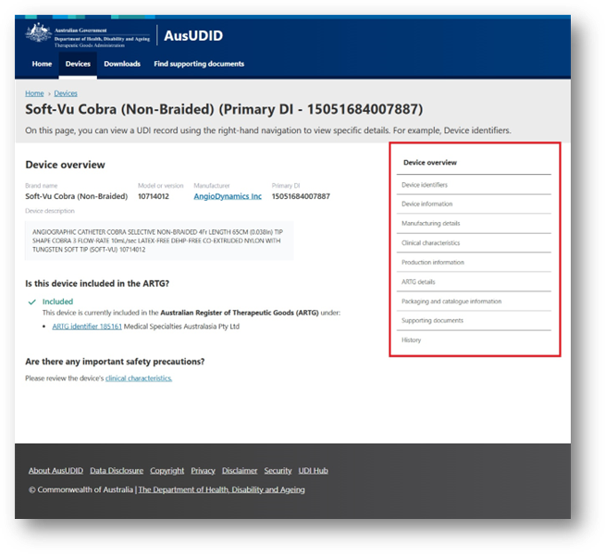

Screenshot of the AusUDID showing a device record for "Soft-Vu Cobra (Non-Braided)". The page displays the Device overview with the brand name, model or version, manufacturer and Primary DI, followed by device description and sections about ARTG inclusion and safety precautions. A red box highlights the right-hand navigation menu with links to Device overview, Device identifiers, Device information, Manufacturing details, Clinical characteristics, Production information, ARTG details, Packaging and catalogue information, Supporting documents and History.
Some information in a UDI record may display as:
- 'Yes'
- 'No'
- 'Not specified'
- 'Not applicable'.
Not all fields are relevant to every device, and not all fields are mandatory. As such, 'Not specified' may mean the information was not provided.
For more information, check the device label, Instructions for Use, supporting documents or information provided by the manufacturer.
Device overview
This tab summarises key information from the UDI record.
You may see:
- Brand name: the name the manufacturer uses to market the device. It helps users and purchasers distinguish the device from other similar products.
- Model or version: the model or version shown on the device label or packaging. It helps identify a specific device type.
- Manufacturer: the manufacturer recorded for the device.
- Primary DI: the UDI-DI allocated to the device. This usually appears on the lowest level of packaging that is required to have a UDI, such as a box or sachet.
- Device description: additional information that can identify the device. It may include information from the label, package insert, or its intended use.
- Is this device included in the ARTG?: shows whether the device is linked to an active ARTG entry and displays the associated ARTG ID, where available.
- Are there any important safety precautions?: shows available safety information recorded for the device.
Device overview
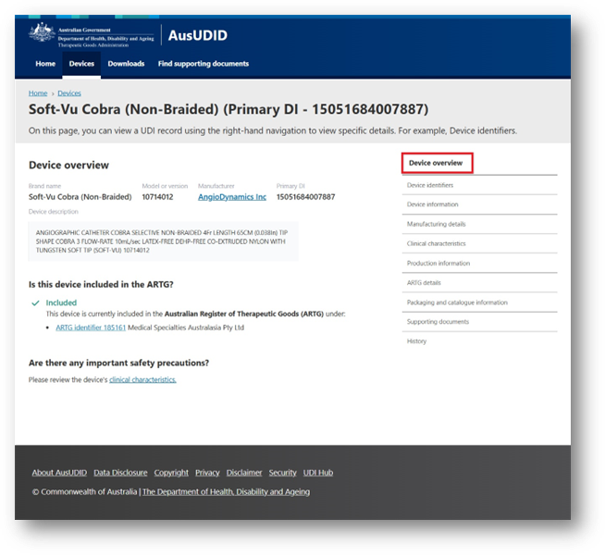

Screenshot of the AusUDID website showing a device record for "Soft-Vu Cobra (Non-Braided)". The page displays the Device overview showing the brand name, model or version, manufacturer, Primary DI, device description, ARTG and safety precautions. A right-hand navigation menu lists device information sections, with Device overview highlighted in a red box.
Device identifiers
This tab includes identifiers associated with the device.
You may see:
- Primary DI: the UDI-DI allocated to the device. This usually appears on the lowest level of packaging that is required to have a UDI, such as a box or sachet.
- Device count: the number of individual medical devices included in the lowest level of packaging or base package.
- Unit of Use DI: a virtual identifier used when a base package contains more than one device and the individual devices do not have their own UDI label or direct marking. It helps identify a single device used on a patient.
- Is the device subject to Direct Marking (DM), but exempt?: shows whether the device is subject to direct marking requirements and has an exemption.
- Is the Direct Marking DI different from Primary DI?: shows whether the Direct Marking DI differs from the Primary DI, if the device has a Direct Marking DI.
- Direct Marked DI: the UDI-DI permanently marked directly on the device. This is only applicable to reusable devices that are reprocessed between use on different patients.
- Secondary DIs: additional identifiers for the device from another Issuing Agency.
- Previous DI: the Primary DI used for the device before a new Primary DI was assigned. It links the new UDI record to the previous UDI record.
- ARTG IDs: the ARTG ID linked to the device.
Device identifiers
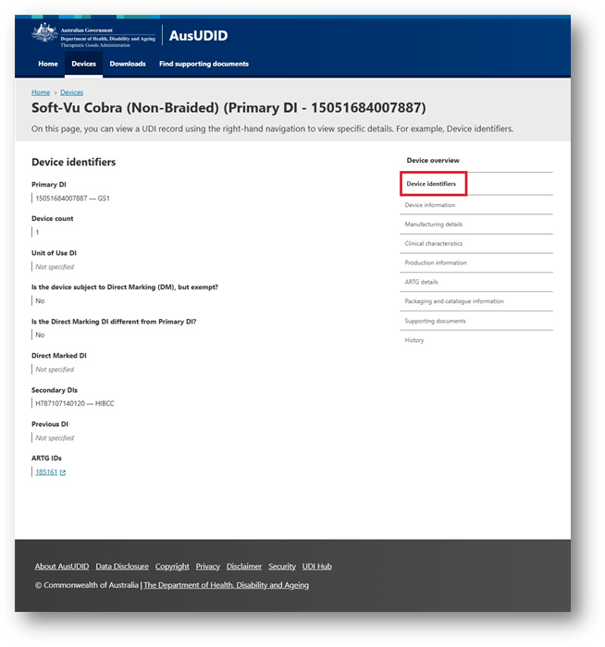

Screenshot of the AusUDID showing a device record for "Soft-Vu Cobra (Non-Braided)". The Device identifiers page shows the Primary DI, device count, Unit of Use DI, Direct Marking details, Secondary DIs, Previous DI and ARTG IDs. A right-hand navigation menu is displayed, with Device identifiers highlighted in a red box.
Device information
This tab includes additional information about the device.
You may see:
- Brand name: the name the manufacturer uses to market the device. It helps users and purchasers distinguish the device from other similar products.
- Model or version: the model or version shown on the device label or packaging. It helps identify a specific device type.
- Device description: additional information that can identify the device. It may include information from the label, package insert, or its intended use.
- Is the medical device software or does it incorporate software?: shows whether the device is Software as a Medical Device (SaMD) or is a device that incorporates software.
- Is the medical device a kit?: shows whether the device is a kit. This may include devices that are referred to as kits, such as SARS-CoV antigen test kits or System or Procedure Packs (SOPPs).
Device information
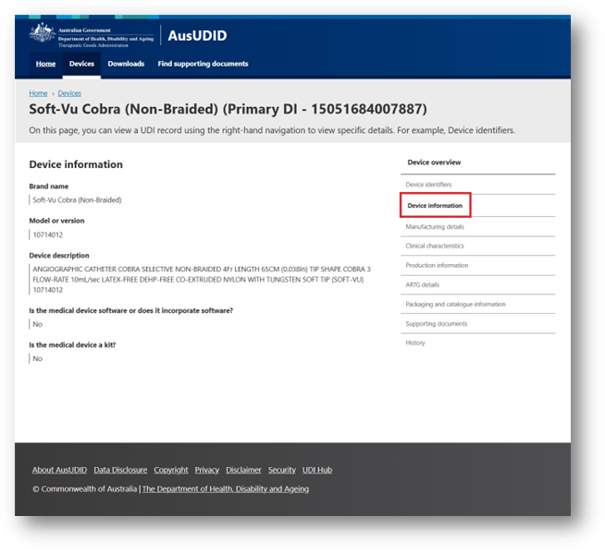

Screenshot of an AusUDID device record for "Soft-Vu Cobra (Non-Braided)". The Device information page displays the brand name, model or version, device description, medical device software and kit information. The Device information section is highlighted in a red box in the right-hand navigation menu.
Manufacturing details
This tab shows the device manufacturer.
Manufacturing details
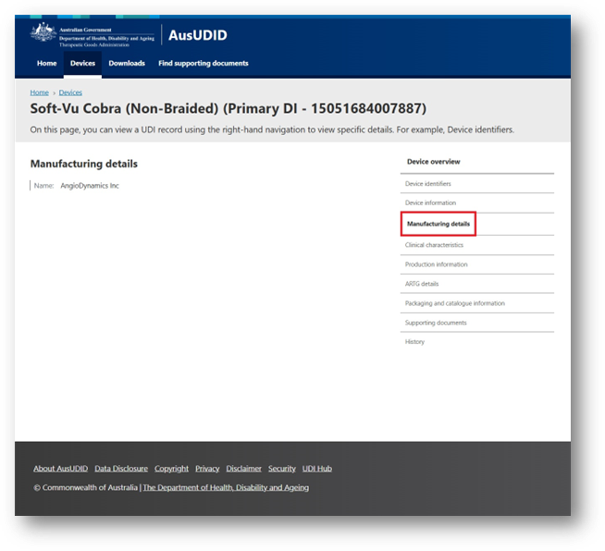

Screenshot of the AusUDID device record for "Soft-Vu Cobra (Non-Braided)". The page displays the Manufacturing details section, showing the company name. In the right-hand navigation menu, Manufacturing details is highlighted with a red box.
Clinical characteristics
This tab provides information about the clinical characteristics of the device.
You may see:
- MRI Safety Status: shows whether the device label includes information about magnetic resonance imaging (MRI) safety. If the label does not include this information, the field displays 'Labelling does not contain MRI safety information'.
- For single use?: shows whether the device is intended for one use on one patient during one procedure. If the device is reusable, this field will display 'No'. If the device is not for single use, but there is no restricted number of reuses, this field will display 'Not applicable'. This applies for devices such as MRI machines.
- Restricted number of reuses: shows the maximum number of times the device can be reused, where applicable.
- Device required to be labelled as containing natural rubber latex or dry natural rubber: shows whether the device label must indicate that the device or its packaging contains natural rubber that may come into contact with the user or patient.
- Device labelled as 'Not made with natural rubber latex': shows whether this statement appears on the label.
- Device packaged as sterile: shows whether the device is sterile when supplied.
- Requires sterilisation prior to use: shows whether the device must be sterilised before use.
- Sterilisation methods: identifies acceptable sterilisation methods that can be used to sterilise the device before use.
- Clinical size: provides the measurement type, value and unit used to describe the clinically relevant size of the device.
- Storage and handling: provides applicable storage and handling conditions, such as temperature, humidity or atmospheric pressure.
Clinical characteristics
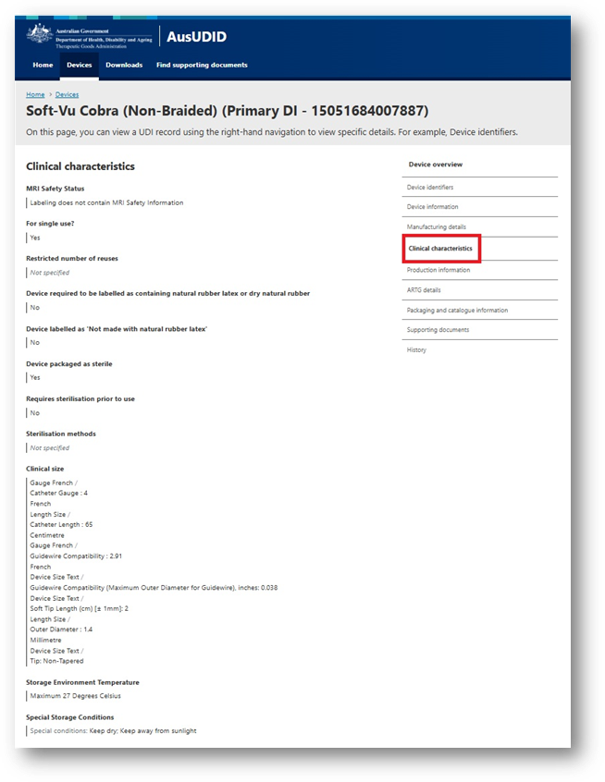

Screenshot of the AusUDID device record for "Soft-Vu Cobra (Non-Braided)". The page displays the Clinical characteristics section, including MRI safety status, single-use and reuse information, natural rubber latex information, sterility and sterilisation details, clinical size, storage temperature and special storage conditions. Clinical characteristics is highlighted with a red box in the right-hand navigation menu.
Production information
This tab shows which types of production identifiers appear on the label.
These include:
- Lot or batch number
- Manufactured date
- Serial number
- Expiration date
- Donation ID number.
The AusUDID records the type of production identifier, not its specific value. For example, it does not include individual lot numbers or manufacturing dates.
Production information
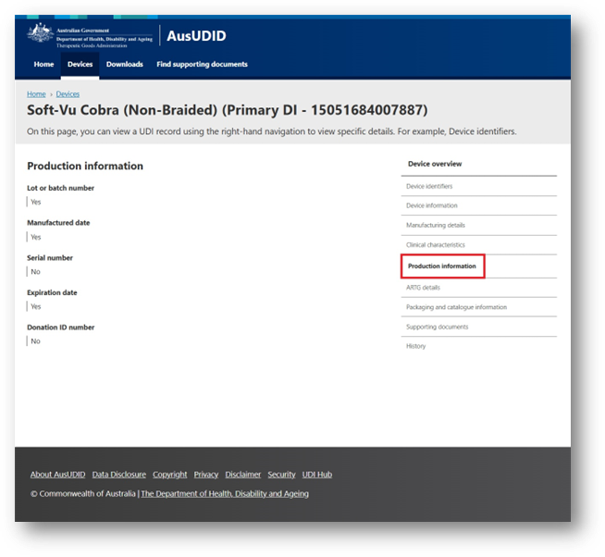

Screenshot of the AusUDID device record for "Soft-Vu Cobra (Non-Braided)". The Production information section shows lot or batch number, manufactured date, serial number, expiration date, and donation identification number. Production information is highlighted with a red box in the right-hand navigation menu.
ARTG details
This tab provides information from the ARTG entry linked to the device.
This includes:
- ARTG ID: the identification number for the linked ARTG entry.
- ARTG name: the name of the linked ARTG entry.
- Product name: the product name recorded in the ARTG.
- ARTG date: the date the device was included in the ARTG.
- Registration type: the type of ARTG entry linked to the device.
- Therapeutic good type: the category of therapeutic good recorded for the ARTG entry.
- GMDN: the Global Medical Device Nomenclature (GMDN) recorded in the ARTG.
- Sponsor: the sponsor’s name and address as recorded in the ARTG entry.
- Manufacturers: the manufacturer’s name and address as recorded in the ARTG entry.
- Licence category: the category recorded for the ARTG entry. For example, INC means included.
- Licence status: the status recorded for the ARTG entry, such as active, suspended or withdrawn.
- Licence class: the device risk classification recorded for the ARTG entry, such as Class III.
You may see more than one ARTG entry linked to a UDI record. This can occur when multiple sponsors supply the same device, or when a sponsor supplies the device under multiple ARTG entries.
ARTG details
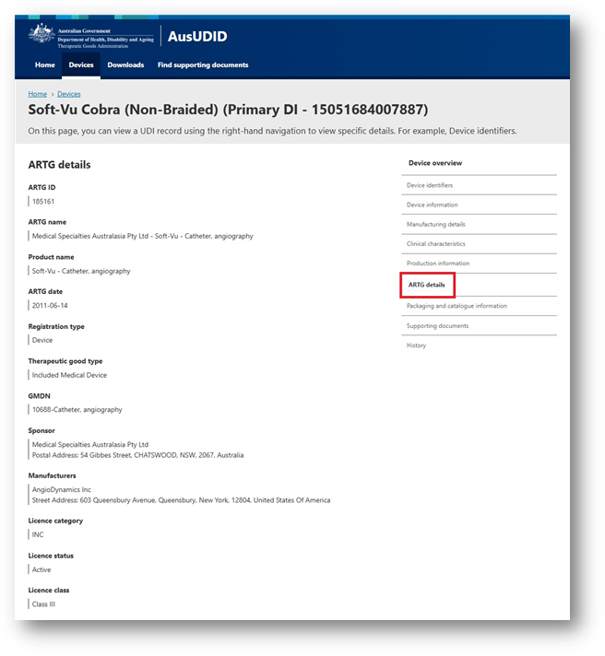

Screenshot of the AusUDID device record for "Soft-Vu Cobra (Non-Braided)". The ARTG details section shows ARTG ID, ARTG name, product name, ARTG date, registration type, therapeutic good type, GMDN, sponsor, manufacturer, licence category, licence status and licence class. ARTG details is highlighted with a red box in the right-hand navigation menu.
Packaging and catalogue information
This tab includes packaging information related to the device.
You may see:
- Packaging: shows any packaging configurations and Package DI(s) related to the device. A Package DI is the UDI-DI that is on a higher packaging level, such as a case or a carton. If there is packaging information available, this section shows the package type and how many devices are contained in that package. This allows you to find a device using the UDI-DI applied to a higher packaging level, without opening that package.
- Catalogue numbers: shows the catalogue number associated with the device. They may also be called a reference, reorder or product number. You may find this number on the device label or packaging, and it may be the same as the model or version number.
- Sponsor commercial distribution end dates: shows the date the sponsor stopped commercially distributing the device. It is important to note that the device may still be available within healthcare storage or available for purchase from third parties or distributors after this date.
Packaging and catalogue information
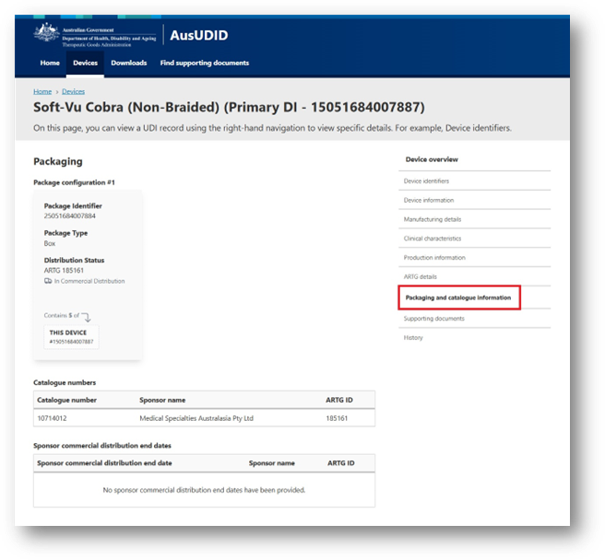

Screenshot of the AusUDID device record for "Soft-Vu Cobra (Non-Braided)". The page displays Packaging and catalogue information, including package identifier, package type, distribution status, catalogue number and Sponsor commercial distribution end date. Packaging and catalogue information is highlighted with a red box in the right-hand navigation menu.
Supporting documents
This tab lists available documents associated with the device. These may include Patient Information Leaflets (PILs) and Instructions for Use (IFUs). Healthcare professionals can download documents to use in clinical care or to provide to patients where appropriate.
'No documents available' means no supporting documents were uploaded for that UDI record.
Supporting documents
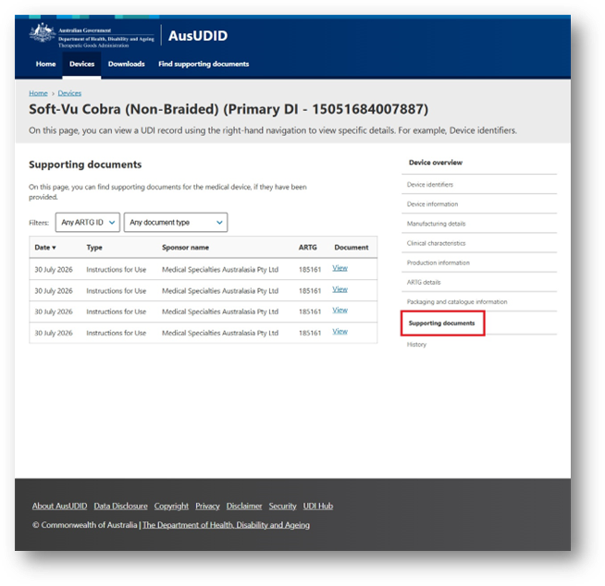

Screenshot of the AusUDID device record for "Soft-Vu Cobra (Non-Braided)". The page displays Supporting documents, including a table that lists four "Instructions for Use" documents, each dated 30 July 2026, with the sponsor's name, ARTG number and a "View" link. Supporting documents is highlighted with a red box in the right-hand navigation menu.
History
This tab shows when the UDI record was created and lists historical versions of the UDI record.
You can use this information to see whether the UDI record has been changed. You can also download current or previous versions where available.
History
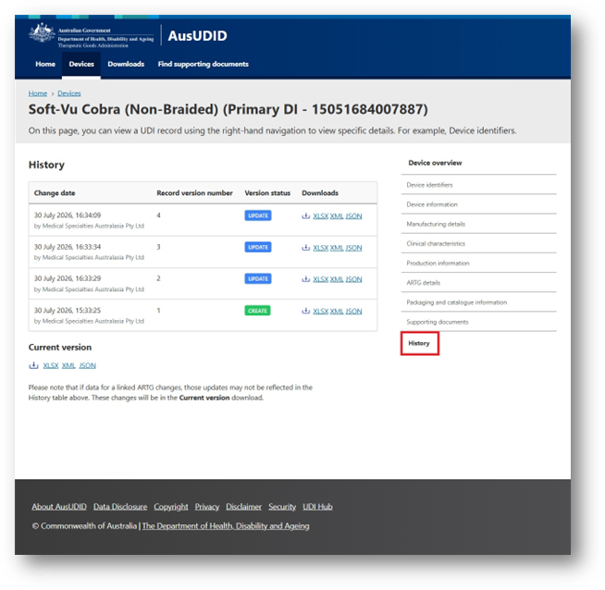

Screenshot of the AusUDID device record for "Soft-Vu Cobra (Non-Braided)". The History section shows four record versions in a table with change dates, version numbers, status and download links. History is highlighted with a red box in the right-hand navigation menu.
Page history
Original publication.
Original publication.