

Adverse drug reaction reporting using Best Practice: Installing the ADR reporting template
Medical practices using the Best Practice software can download and install templates to their software to create Adverse Drug Reaction (ADR) reports.
Completed reports can be emailed to us at ADR.Reports@health.gov.au, faxed to 02 5114 3005 or posted to us at: TGA, PO Box 100, Woden ACT 2606, Australia.
Before you start
This user guide assumes a working knowledge of Best Practice. For installation purposes you will need to be connected to the Internet in order to download the template from our website.
Download the ADR Reporting template
The ADR Reporting template can be accessed at:
Download the BP ADR Reporting Form.rtf from the TGA website and SAVE to the desktop.
Note: Do not OPEN the template - this may corrupt the merge fields.
Install the template in Best Practice
- Open Best Practice.
- Open the word processor (or F4)

- Select Templates; Import template, as shown in figure 1.
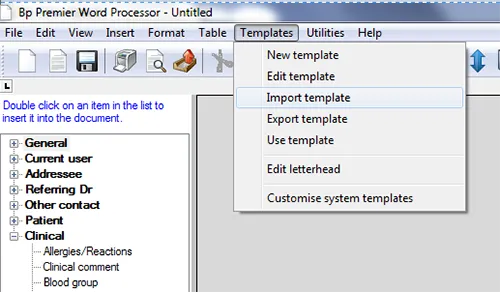
- Select BP ADR Reporting Form.rtf.
- Select Save Icon – name the template 'BP ADR Reporting Form' and select the "Available to all users" tick box, as shown in figure 2.
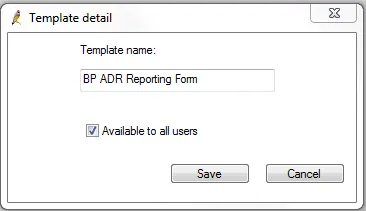
- Select 'Save'.
Open the saved template
The template can now be accessed under 'Templates'; 'Use template', as shown in figure 3.
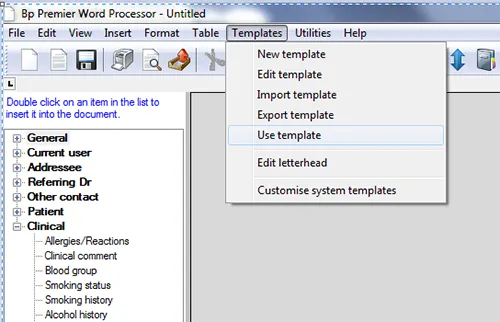
Using the template
A user guide is available for using the ADR Reporting template in Best Practice on our website.
| Version | Description of change | Author | Effective date |
|---|---|---|---|
| V1.0 | Original publication | Technical and Safety Improvement | October 2018 |
Page history
Fax number updated to 02 5114 3005
Email address updated to ADR.Reports@health.gov.au
Fax number updated to 02 5114 3005
Email address updated to ADR.Reports@health.gov.au